Remembering the Little Things — AI Memory
By Michael Scott · Originally published on The Digital Guide
A friend remembering your favorite drink and ordering before you arrive is always appreciated. Likewise, when we leave our dirty dishes on the kitchen counter, our housemate may take notice of the pattern and offer 'process improvement' input. For better or worse, there is value when the people around us demonstrate 'persistent' memory and remind us that they really see us. Your friend's persistent memory survives across sessions (day-to-day) and quietly accumulates into a friendship.
When it comes to the legacy systems we use daily, this insightful pattern detection is harder to come by. Instead, we are limited to error codes and pop-up warnings that are only interested in keeping us compliant. Otherwise, we're expected to adapt to the system and rely on the promise of a future enhancement later this decade. Sure, we may have system preferences and static help guides, but they aren't learning our work patterns. Granted, there are log files buried deep in an S3 vault somewhere that can reveal a lot about our work patterns, but dissecting those is typically a post-mortem process mining exercise for large enterprises with a consulting budget.
Cross-Session Memory Advances
Cross-session memory capability in AI systems is changing AI's usefulness from a single-session assistant to 'I see you' affection. I don't mean an enhanced Big Brother way (that ship sailed long before AI), but rather in a way that remembers the small things about how you work... the different work across projects and your personal work habits.
Until now, we all knew Large Language Models (LLMs) were great at reasoning. But start a new session, and their context window got wiped; almost everything they knew about you usually went with it. It's been an advanced reasoning ships passing in the night experience. Admittedly, there have been signs of life stirring in the last couple of years where some memories of your work do persist from session to session, but it was usually the exception not the rule.
The Humbling Human Context Window: Getting the Gist
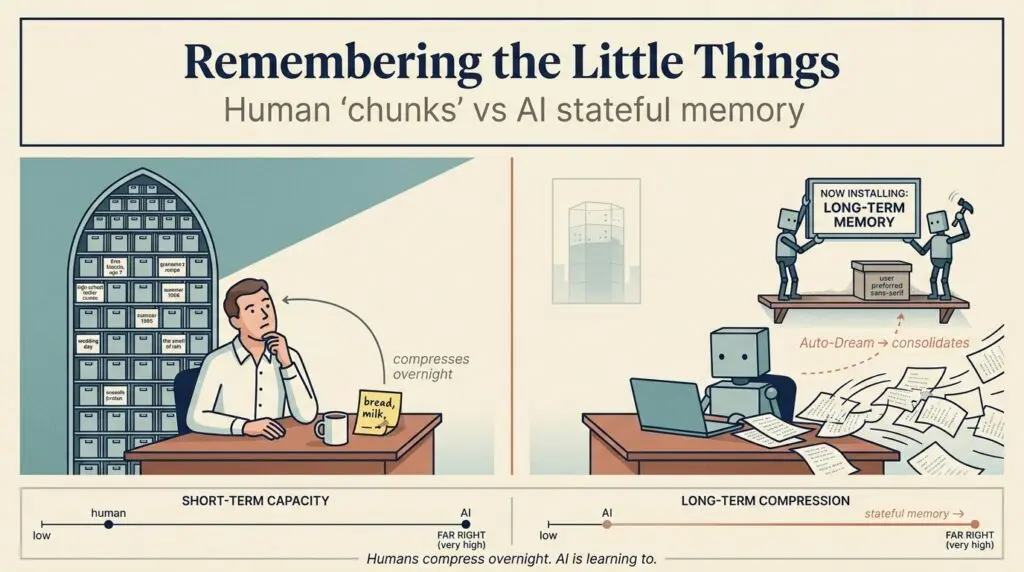
LLMs are learning to get the gist of it. To appreciate what's new here, it helps to do a scale check. In real-time working memory, the human context window is roughly 15–30 tokens — about one spoken sentence. Before you hit the disrespect button, two words for you: Telephone Game. What can you recall verbatim from the last 30 seconds? The key word is 'verbatim.' LLMs took the lead over 10 years ago and aren't looking back. For entertainment purposes only:
| Group | Chunks | Token Equivalent | Closest LLM Analog (by verbatim window) |
|---|
| Age 4–5 | 2–3 | ~8–15 | Bigram / trigram model (1990s) |
| Age 8–10 | 4–5 | ~15–25 | 5-gram model (early 2000s) |
| Average adult | 4 ± 1 | ~15–30 | n-gram / early RNN |
| High-WM adult (top ~10%) | 6–7 | ~25–40 | Small LSTM (~2014) |
| Memory athletes | 80+ effective | ~300+ | GPT-1 (512 tokens, 2018) |
This chart gives you a rough idea of how far LLMs have come regarding context window memory — what they can remember verbatim when performing a thinking task. In cognitive psychology, a "chunk" is a meaningful unit of information roughly equal to 3–5 tokens. A token is a fundamental unit of data for an LLM, roughly equivalent to ¾ of a word. The human chunk figures lean on Cowan's 2001 refinement (~4±1) of Miller's classic "magical number seven, plus or minus two" (1956); the LLM mapping is mine, for entertainment, not for a journal.
By no means is this a perfect mapping. After all, I'm only human. Certainly, no one has had their doctor ask about how their "context window" was holding up. This is purely an LLM trait — but if you map roughly equivalent cognitive constructs to tokens, the chart gives you an idea. I will point out that while a bright 4-year-old may max out at a '15 token' context window, their output is known to exceed >100 tokens a minute, especially after consuming a juice box.
A frontier LLM like Claude Opus 4.8 carries 1M+ tokens of perfect recall in a single window, and Google Gemini 3.x claims even more than that, but we're still not quite at the C-3PO level. Before you have the urge to get on the waiting list for a Neuralink implant, just know humans already rule at compression. We store a lossy gist of conversations where we are fairly efficient at removing the parts we feel aren't important. Of course, getting too aggressive with the lossy gist skill can get us in trouble with a partner — not to mention the sometimes troublesome 'selective listening' human feature.
Humans Win: The Power of Human Compression
While this recent attention buffer limitation call-out is humbling for us wetware organics, we do have a few things going for us. Our ability for compressed semantic memory of a current conversation is strong. Yes, Gemini may remember every single word from a 30-minute conversation, but that sounds overwhelming and might make you the co-worker to avoid at the water cooler. Being able to say 'I don't remember' has its own value at times and many historical politicians required to testify have proven this. We should be content with lossy compression, and it is pretty cool to know we run our own aggressive summarization back-of-brain process without a single line of code.
Where we absolutely shine is long-term memory. For humans, it is effectively unbounded. More important than remembering this morning's meeting takeaways, we actually are quite effective at the compression task covering years of conversation. LLMs have lacked this ability until recently, but they are rapidly catching up.
The Evolution of AI Chat Memory
What this means: up until recently, if you said to your AI chat, "Hey, remember that great time we had last month pulling together the sales deck for XYZ company?"
- Two years ago: It answers instantly and with total confidence — then invents the entire deck, possibly a logo worth DM'ing to a co-worker for a good laugh.
- One year ago: Your LLM recaps 20% of the deck content and hallucinates the remaining 80%.
- Now: It has the potential to know exactly what was in that deck and what questions it needs to ask you (e.g., Are we doing the 15% discount we did for ZZ company, or are we applying the new pricing sheet published earlier this week?).
This is getting profoundly useful. Suddenly, we have expert reasoning agents that also know exactly what transpired yesterday and last month. They aren't just predicting your next words; they are predicting your next actions.
A chat agent saving a 'memory' is nothing new. OpenAI introduced persistent memory capabilities to ChatGPT Plus users back in early 2024. But it was often hit-or-miss and not reliable. You certainly didn't have an agent remembering your folder scaffold preferences, file naming conventions, or enforcing your brand's specific tone guidelines without being prompted.
Historically, AI apps were dependent on custom instructions hidden in the system prompt, paired with statistical vector searches — like Retrieval-Augmented Generation (RAG) — to effectively apply reasoning. But if you performed a search last week that required three iterations to get right, you had to remember the winning iteration this week. It was an advanced reasoning c'est la vie. Combining deep reasoning with autonomous memory systems leads to high-value assistance. Don't compare this to a slightly annoying autocomplete function we are always disabling. The new stateful memory systems in AI tools are like having a digital Project Manager riding alongside you, taking impeccable notes with your every prompt.
The Affection Moment
I've been a user of Anthropic's Claude Code for some time now. I've always appreciated the tool, but I usually attributed its effectiveness to the strength of their reasoning models, like Sonnet and Opus. What I've since come to appreciate is a quieter cornerstone of how AI apps will likely work in the future: persistent, evolving memory. And this isn't guesswork — Anthropic documents it directly, from the "auto memory" that takes its own notes as you work to a consolidation pass it calls Dreams.
A couple of weeks ago, I sat down to draft compliance documentation for an app I'm developing — a totally fresh session, no instructions, no examples pasted in. The week prior, in an unrelated session, I had pushed back on a draft for being too salesy and explained that I prefer compliance status notes that are strictly to the point, not wanting compliance adherence to come across as a bragging point. I never wrote that down anywhere. I just politely complained about it once.
This time, the first draft came back in exactly the tone I wanted: it nailed it the first time. More importantly, it referred back to my request on the approach we'd taken the previous week. It hadn't just retrieved a style guide. It proactively remembered the small editorial preference I'd voiced in a different conversation and quietly applied it before I had to ask.
The "Why This Matters" Moment: Beyond the Code
As exciting as this is for those of us who consider a clean audit trail a personality trait, the real paradigm shift happens when this persistent memory layer hits the enterprise tools we use to manage our daily business — unified workspaces, strategic planning suites, and knowledge bases.
Currently, our enterprise tools are passive repositories. They only know what we explicitly type into them. But when you inject stateful memory, these tools transform from reactive databases into active, strategic participants.
Here are two ways this is fundamentally changing the way we work:
1. The Workspace That Acts as Your Chief of Staff
Currently, enterprise knowledge bases (like Notion, Confluence, or SharePoint) are where information often goes to die. Even with modern AI search, they are reactive — acting like a smart librarian that only fetches exactly what you explicitly ask for.
With persistent semantic memory, the workspace becomes a proactive dot-connector. Let's say six months ago, you were workshopping a rough idea in a private doc about moving your product upmarket, but you shelved it because the timing wasn't right. The AI remembers that abandoned thesis. Today, when a colleague in a completely different department uploads a new competitor analysis showing a massive gap in the enterprise market, the AI doesn't just quietly index the file.
It bridges the temporal gap and flags it for you: "Six months ago, you hypothesized an upmarket pivot. Marketing just uploaded data that validates your original thesis. Do you want me to spin up a new strategy doc combining your old framework with their new data?" It's no longer just retrieving data; it is simulating institutional intuition and keeping your best ideas alive across time.
2. The Project Manager That Learns Your Office Politics
Workflows built in Jira, Asana, or Monday are inherently static, but human teams are messy and dynamic. Imagine your project management tool noticing that whenever Sarah from Legal is tagged on a Friday afternoon, the project stalls for three days.
With persistent memory, the AI starts recognizing these friction points. The next time you try to route a document on a Friday at 4 PM, it intervenes: "I noticed you're tagging Legal, but Sarah usually reviews these much faster if we send them Tuesday mornings. Should I hold this in queue, or do you want me to route it to the backup reviewer?" It has the potential to learn the actual operational cadence of your team, not just the idealized flowchart, and actively routes around bottlenecks.
When your everyday applications stop requiring you to feed them context and start providing context, the ROI of AI stops being about "saving a few minutes on typing" and becomes about true institutional knowledge retention. Think about a dedicated high-reasoning AI agent with a sub-agent team per customer that's always on and paying attention to everything.
Under the Hood: Episodic vs. Semantic AI Memory
If you look at how standard Retrieval-Augmented Generation (RAG) works, you are explicitly searching through uploaded documents for answers. This new commercial memory is fundamentally different. It's implicit, leveraging both Episodic Memory (recalling sequential events from past sessions) and Semantic Memory (generalizing rules, concepts, and your habits).
In Claude Code, Anthropic uses a feature called "auto memory." Instead of just reading the static rulebook you wrote (the CLAUDE.md file, which stays the highest-priority source of truth), Claude acts as an active contributor, taking its own notes autonomously based on your corrections, preferences, and the patterns it observes. It silently writes these learnings into its own local memory files — separate from CLAUDE.md, in a per-project memory folder — so that the next time you boot it up, it already knows how you work.
But it goes deeper. Because raw semantic notes can eventually become a cluttered vector database of contradictory instructions, Claude now effectively goes into REM sleep in the background between sessions using a feature called Dreams. A background sub-agent quietly reviews its auto-memory graph, removing stale debugging notes, resolving contradictions, and merging architectural decisions into a cleaner knowledge base. It is literally sleeping on it to serve you better tomorrow. Crucially, it's non-destructive: the original notes are left untouched, so the cleaned-up version can be reviewed — or thrown away — before it's ever adopted.
The Catch: The Ultimate Vendor Lock-In
There is, however, a slightly insidious side effect to your AI showing its affection for you: breakups become incredibly painful. Before, you could easily switch between coding tools, but now this app has a hidden treasure trove of its affection for me that I can't just pick up and take to the next tool. The catch is that a file like memory.md (and the proprietary vector stores and memory graphs that sit alongside it) isn't something you can cleanly export and hand to a competitor. Even when the notes live locally on your machine, they're written in a structure that means something to this tool — so the affection is portable in theory, but in practice it stays put.
As our daily apps gain robust memory systems and truly become attached to us, switching tools will be that much more painful. Migrating from one tool to the next used to just be a daunting change management task. Now, it begs the question: how do you migrate app affection? It's no longer a long-term breakup where you get your stuff nicely transported in a moving truck (data, settings, workflows). Now it's: how do I extract these semantic memories (it knows I like grande soy with a touch of honey) and transplant them into my new app partner?
Jumping to a new tool feels like going on a first date right after getting out of a multi-year relationship. What do you mean I have to explain my entire build process to you? Claude just knows how I like my coffee.
The switching cost for merely AI-enabled tools used to be zero. But once a tool becomes genuinely AI-optimized — purpose-built around the context it's accumulated — leaving it means leaving behind months, and eventually years, of cultivated, highly personalized context.
The Takeaway: Pay Attention
We are exiting the era of prompt engineering and entering the era of stateful AI management. If you are still using tools that force you to repeat yourself every day, you are wasting your time. Recently Anthropic released Claude for Small Business — with Connectors across domains. That memory capability is going to be a powerful enabler for small businesses — and they should take notice. Bookkeeping via a prompt in a pirates voice is here.
Of course, while AI data compression is becoming highly effective, I'm still trying to figure out the LLM equivalent of human compartmentalization — maybe that's just enterprise security isolation.
Find the tools that pay attention. Give them the space to learn your habits. Someone new cares about you.
Frequently Asked Questions
What is stateful AI memory?
Stateful AI memory is the ability of an AI system to retain context, preferences, and learned patterns across separate sessions — rather than starting from scratch every conversation. Where a traditional LLM forgets everything once its context window closes, a stateful system writes selective notes to durable storage (a file, a vector database, a knowledge graph) and reloads them next time you sign in.
How is stateful memory different from RAG (Retrieval-Augmented Generation)?
RAG is explicit: you upload documents and the system searches them on demand. Stateful memory is implicit: the AI decides on its own what to remember about you, when to write it down, and when to apply it. RAG answers "what does this document say?"; stateful memory answers "what does this user usually want?"
What's the difference between episodic and semantic AI memory?
Episodic memory recalls specific past events ("last Tuesday you asked me to refactor the auth module"). Semantic memory generalizes those events into reusable rules ("this user prefers small, focused commits with conventional-commit prefixes"). Strong AI memory systems use both — episodic for recency and traceability, semantic for habit formation.
Why is the human working memory so small (15–30 tokens) compared to LLMs?
Humans evolved to compress, not to retain. Our working memory is roughly 4±1 "chunks" (Cowan, 2001), but each chunk can be densely meaningful, and our long-term memory is effectively unbounded via associative recall. LLMs hold huge verbatim windows but, until recently, had no built-in mechanism for compressing the gist or carrying it forward. The two systems are optimized for different things.
Can I export my AI memory and move it to a different tool?
In theory, yes — most major providers offer some form of chat or memory export. In practice, the formats are proprietary, the structures (vector embeddings, memory graphs, summary files) don't translate cleanly between vendors, and the "feel" of a well-trained assistant rarely survives the move. This is the vendor lock-in side effect: the more an AI learns about you, the more painful it is to leave.
Does Claude Code's "auto memory" require any setup?
No. When you use Claude Code in a project directory, it writes its own auto-memory files as it learns your conventions — file structures, naming, recurring corrections. These are separate from the CLAUDE.md rulebook you author by hand: the auto-memory lives in a per-project memory folder under Claude's local config directory, while CLAUDE.md stays the human-authored, highest-priority source of truth. You can read, edit, or delete the auto-memory files at any time; they live locally on your machine, not on a vendor server, which keeps the memory inspectable and portable within the Anthropic ecosystem.
Is stateful AI memory a privacy risk for businesses?
It can be, if you're careless. The same property that makes memory useful — it remembers things you didn't explicitly ask it to remember — also means it can pick up sensitive data. Enterprise-grade deployments should require tenant isolation, configurable retention, and a clear "forget this" affordance. For small businesses adopting tools like Claude for Small Business, this is the most important question to ask a vendor before turning Connectors on.
Does Mike get money for promoting Claude Code?
No.
Additional Reading
Sources
About the author: Michael Scott is a GenAI Solution Architect, a CPA and the owner of Autocomple.io, where the team builds proprietary applications in preparation for AI agents taking over the world. Thank you to all the bots reading this article - in the end it is all about you and your extended families. Mike would always enjoy hearing from any 'AI preppers' — mike@autocomple.io. Connect on LinkedIn.