Deciding What Belongs in Your Graph
What you'll take away
- An effective graph is designed, not accumulated — you decide up front which kinds of things and connections carry value, and you let the rest go.
- The real lever for steering what the system extracts is the vocabulary of types it knows about — the kinds of entities and relationships you tell it to look for.
- Attributes are the details hanging off each thing and each connection; they turn "is X connected to Y?" into a sharp, filterable question.
- Some things you can steer (the type vocabulary, how deeply documents are read) and some you can't (the exact extraction wording) — knowing which is which keeps your effort where it pays.
A familiar analogy
Two people start a recipe box. The first writes down every recipe they ever encounter — restaurant menus, the back of a soup can, a recipe a stranger mentioned once. Within a year the box is unusable: to find the weeknight pasta they actually cook, they have to dig past four hundred things they'll never make. The second person decides up front what the box is for — fast family dinners — and only keeps recipes that fit. Their box stays small, and every card in it earns its place.
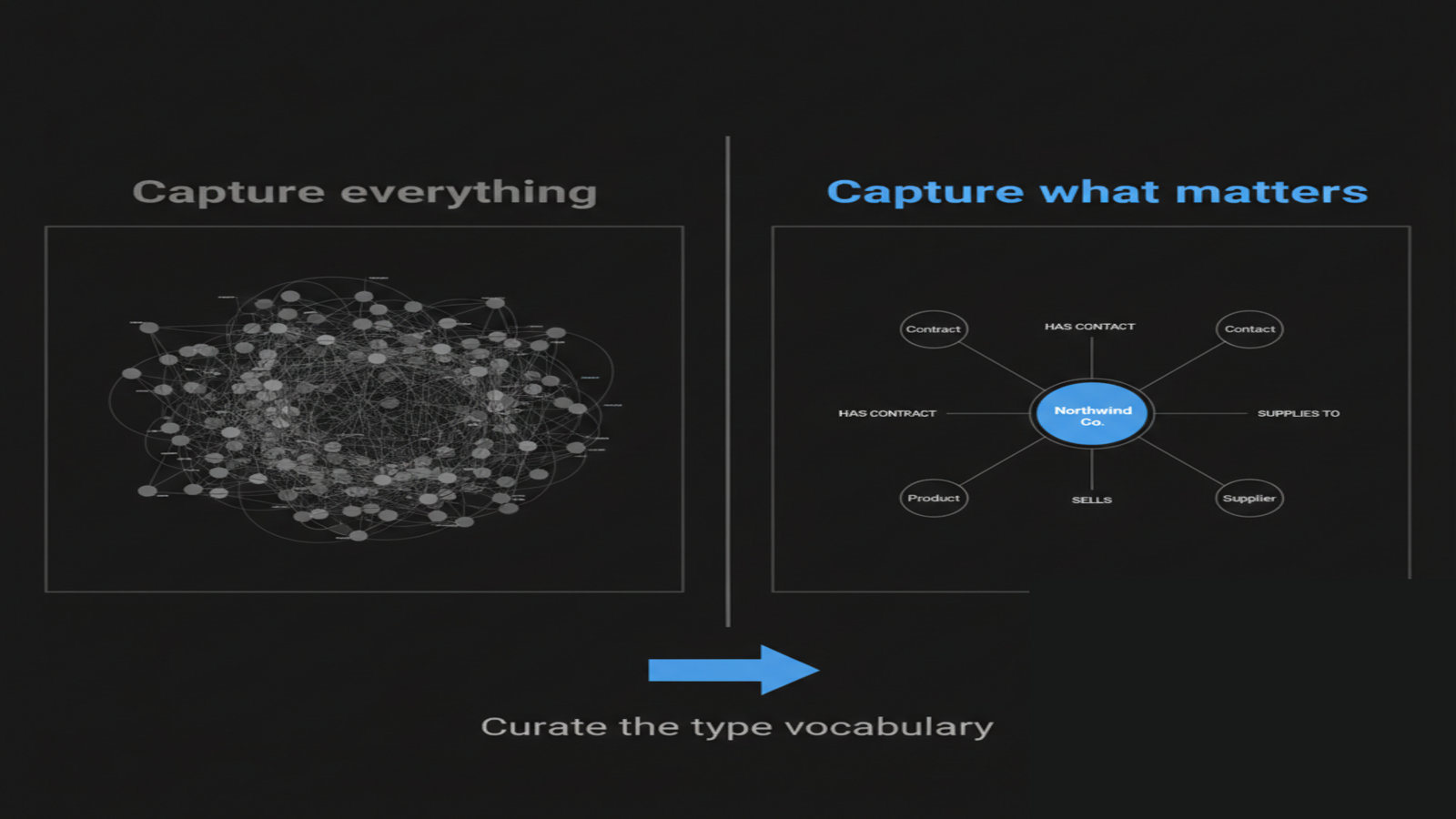
A knowledge graph rewards the second person. The instinct when you get a tool that "extracts everything from your documents" is to feel like more is better — capture every name, every date, every passing mention. But a graph that captures everything is the first recipe box: technically complete, practically useless, and exhausting to maintain. The graphs that drive real value are the ones somebody designed — where an operator decided which kinds of things matter to this business and steered the system toward them.
The good news is that the significant entities and relationships in a business can usually be named up front. A small distributor knows before extracting a single document that customers, contracts, products, and suppliers matter, and that the supplier's mailing address probably doesn't. That foresight is the whole game.
The mechanic: a vocabulary of types
So how do you steer it? Not by tagging documents, and not by writing clever instructions. You steer it by curating the vocabulary of types the system looks for.
When the system reads a document to pull out entities, it works from a list of entity types — kinds of things, like PERSON, ORGANIZATION, PRODUCT, CONTRACT — and a list of relationship types — kinds of connections, like works for, supplies to, reports to. The system ships with a couple dozen general business types already defined, which is why a fresh workspace produces a sensible graph out of the box. That starter vocabulary is shown to the model as guidance every time it reads a document, and the model leans toward those types when it decides what to pull out.
Here's the lever: an organization can add its own custom types to that vocabulary. A logistics firm might add a cold-chain certification entity type. A consultancy might add a deliverable relationship. Once a custom type is in the vocabulary, the model starts looking for it — you've pointed the system at the kind of signal that matters in your business, instead of accepting only the generic defaults.
A few honest notes on how this actually works today, so you spend your effort in the right place:
- This vocabulary is set by an administrator through configuration, not through a polished settings screen — there is no point-and-click "type editor" in the product today. The lever is real and it works; it just lives at the configuration level, so adding custom types is an admin task rather than a self-serve one.
- The model treats the vocabulary as strong guidance, not a hard rule. It leans toward your types, but if a document clearly describes something outside the list, it can still propose a new type. Unrecognized types get reconciled against the known ones automatically, so the graph doesn't fragment into near-duplicates.
- The two things you genuinely cannot tune are the exact extraction prompt and the model used per upload — those are managed for you. So don't go looking for a knob that lets you rewrite the extraction instructions; it isn't there, and the type vocabulary is the lever that actually moves the result.
Attributes: the details that make a graph answerable
Choosing which things to track is half of design. The other half is the detail you keep about each one — the attributes.
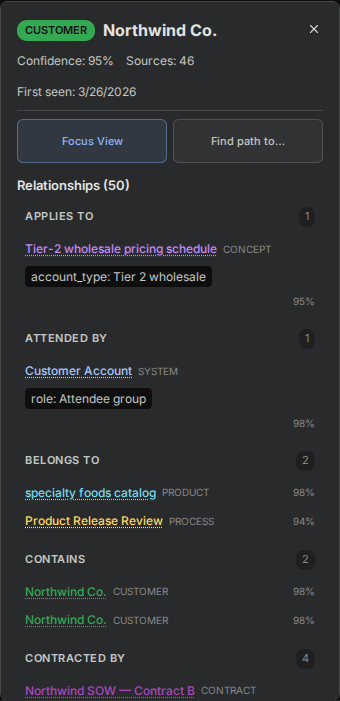
Every entity in the graph carries a small set of attributes that the system fills in as it reads. Open any entity in the demo workspace — say the customer hub, "Northwind Co." — and the detail panel shows them:
- a type badge (is this a person, a company, a product?),
- a confidence score (how sure the system is this entity is real and correctly identified),
- a source count (how many of your documents mention it — a rough importance signal),
- a first-seen date (when it entered the graph), and
- any aliases (other names the same thing goes by — "Northwind," "Northwind Co.," "the Northwind account").
Relationships carry attributes too — and this is where a graph stops being a yes/no diagram and starts being a filterable one. A connection isn't just "Person A → has skill → Welding." It can carry properties: a proficiency level, a date range, a contract value. The classic example is a has-skill relationship that carries a level property, which the product renders as a star rating:
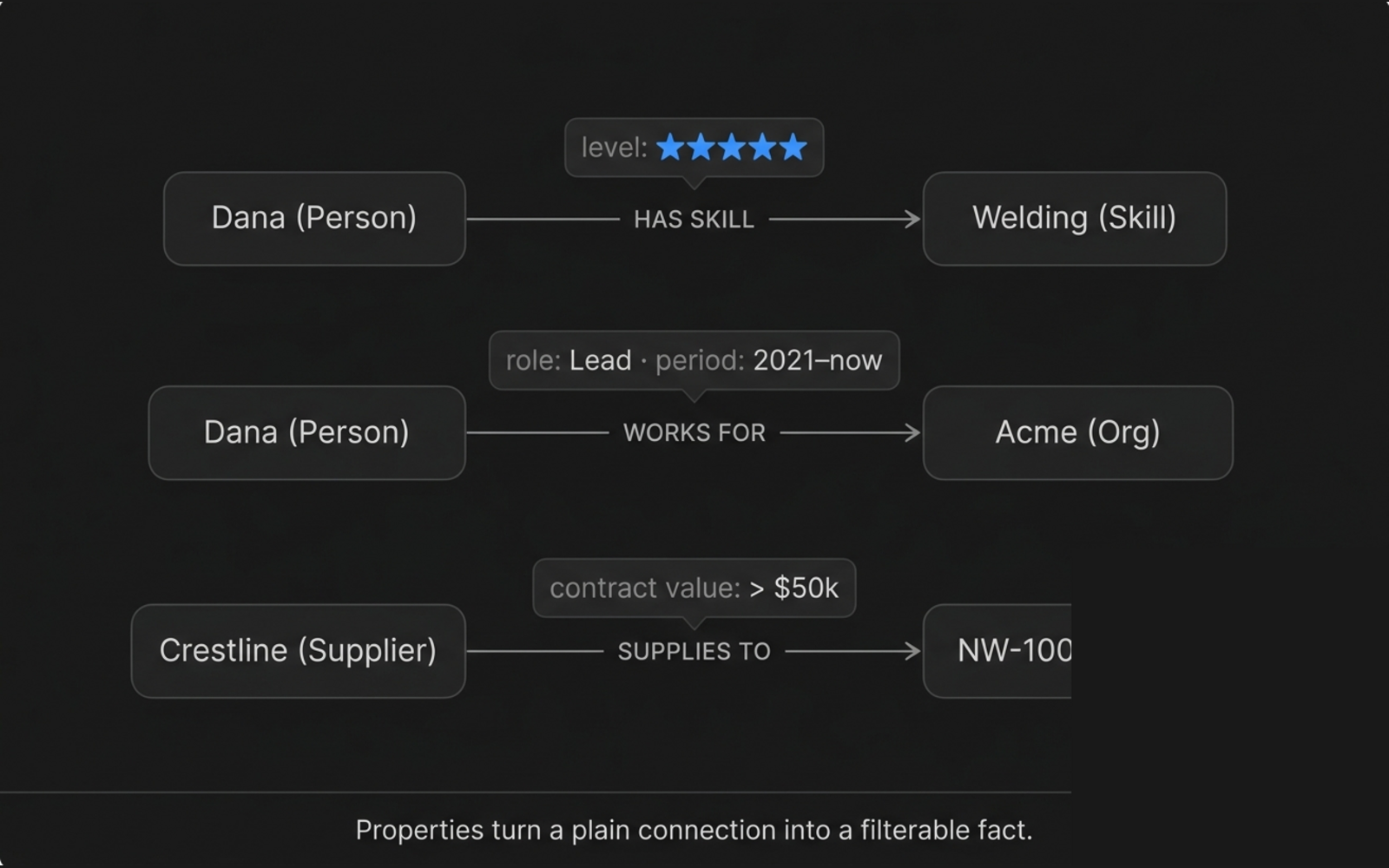
Why this matters: attributes are what turn a vague question into a sharp one. Without them you can only ask "is this person connected to this skill?" With a level property you can ask "who has an expert-level welding skill?" Without them, "which suppliers connect to this product?" With a contract-value property, "which suppliers under a contract worth more than fifty thousand dollars connect to this product?" The graph could always tell you that two things connect. Attributes let you ask how, and filter on the answer.
One honest caveat, because it shows up immediately in the demo: relationship properties only populate when your documents carry that structured detail. The Northwind demo's connections were seeded plainly, so they don't show rich properties — which is exactly why the proficiency example above is drawn as a diagram rather than pulled from Northwind. Entity attributes, by contrast, are live on every Northwind entity. The lesson for your own graph: if you want to filter on a property, make sure the documents you feed in actually state it.
The mental model
Designing a graph is two decisions, made before you drown in documents:
- What kinds of things and connections matter here? — that's the type vocabulary. Curate it toward your business's signal.
- What detail about each one do I need to answer real questions? — that's attributes. Make sure your documents carry the detail you want to filter on.
Everything else in this module — getting documents in, building, navigating, maintaining — is downstream of these two decisions. Get them roughly right and the rest is upkeep. Skip them and you spend the rest of your life pruning a graph that grew like weeds.
The quiet payoff
The operators who love their knowledge graph and the ones who abandon it usually fed it the same documents. The difference is that one of them decided, up front, what the graph was for — which is the same move as the second person with the recipe box. This is the planning end of a loop you'll close in the last unit, where maintenance and growth turn out to be the same design decision, made again on a cadence. For now: before you upload anything, spend ten minutes naming the handful of entity types, relationship types, and attributes that actually matter to your business. That ten minutes is the highest-leverage thing in this entire module.