Adding Your Documents the Right Way
What you'll take away
- What you feed a knowledge system shapes the ceiling of what it can ever know — garbage in, gaps out.
- Only two upload-time choices actually change what gets extracted: how deeply the system reads (Extraction Depth) and how it weights importance (Priority).
- The metadata that feels like it should steer extraction — document type, category, tags, description — organizes your library but does not change which entities get found.
- Knowing that split keeps you from fiddling with knobs that do nothing and ignoring the two that matter.
A familiar analogy
Hand a research assistant a stack of documents and a deadline, and the depth of their answer depends on two things you control. The first is how carefully you ask them to read: "skim these for the gist" produces a different result than "read every page closely." The second is how you flag importance: "this contract is the priority, the rest is background" tells them where to spend their best attention. What doesn't change their reading is the colored folder you filed each document in. The folder helps you find things later. It doesn't make the assistant read any differently.
A knowledge system ingests documents the same way. When you upload, you're handing the system a stack to read, and you get those same two real controls — how deeply to read, and what to treat as important — plus a set of filing labels that help you organize but don't touch the reading itself. Most people get this backwards: they agonize over picking the perfect document type and tags, and never touch the two settings that actually shape the graph.
The mechanic: the two knobs that matter
When you upload a document into the demo workspace, the upload screen offers a handful of choices. Two of them change what ends up in your graph.
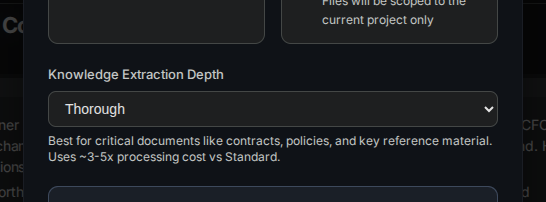
Extraction Depth controls how much of the document the system actually reads when pulling out entities and connections. A longer, deeper read finds more — and costs more in processing. The depth setting is a dial between fast and shallow and thorough and complete:
- Quick samples lightly — good for a low-stakes document where you just want the headline entities.
- Standard is the balanced default and the right choice most of the time.
- Thorough reads deeply — reserve it for the documents that genuinely matter, like a master contract or a core product spec, where missing a connection would hurt.
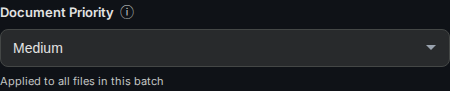
Priority tells the system how much weight to give the knowledge it pulls from this document. A high-priority upload produces facts the system treats as more important when it later decides what to surface. Set the master service agreement to high; set the parking-lot memo to low.
What does not steer extraction
This is the part worth committing to memory, because it saves you wasted effort. The upload screen also lets you set a document type, a category, tags, and a description. These are real and useful — they're how you filter and find documents later, and how you keep a large library navigable. But none of them change which entities and connections the system pulls out. The extraction reads the document's content; it does not read the label you filed it under.
So if you upload a vendor contract and tag it "supplier," that tag does not make the system more likely to find the supplier entity. The system finds the supplier because the supplier is in the text. Tagging is for your benefit as a librarian, not the extractor's.
Steers what gets extracted:   Extraction Depth   ·   Priority
Organizes your library:       Document type  ·  Category  ·  Tags  ·  Description
Not yours to tune:            the extraction wording  ·  the model used per upload
The mental model
Think of an upload as two separate acts that happen to share one screen. One act is feeding the reader — Extraction Depth and Priority, the two settings that shape what the graph learns. The other act is filing the document — type, category, tags, the labels that help future-you find it. Both matter. They just matter to different people: the reader, and the librarian. Don't confuse the librarian's tools for the reader's.
The quiet payoff
The cleanest graphs come from operators who match the depth to the document. They don't read everything thoroughly — that's slow and expensive and buries signal under detail. They don't read everything quickly either — that misses the connections in the documents that matter most. They read the few important documents deeply, the rest at standard depth, and they spend zero minutes worrying about whether the tag should say "contract" or "agreement." That discipline, applied at the front door, is half of why their graph stays clean. The other half is what you do after extraction — which starts with building the graph itself.