Conversations: What Your Team Is Asking
What you'll take away
- A knowledge system that remembers only documents forgets the most useful signal of all — the questions people actually brought to it.
- The Conversations tab is episodic memory: a record of past sessions, summarized into cards you can browse.
- These summaries are created automatically from real chats; you don't author them, you read them.
- Reading them tells you what your team cares about and where the knowledge base is being leaned on — and where it might be falling short.
A familiar analogy
A good front-desk person remembers more than the files. They remember that three different customers asked about the same shipping delay this week, that the new product keeps coming up, that nobody's asked about the discontinued line in months. None of that is written in any document. It lives in the questions — and the questions are often a sharper read on what's going on than the official records, because they're what people actually needed in the moment.
A knowledge system can keep this kind of memory too. Alongside the facts it pulled from documents, it remembers the conversations people had with it — not word for word, but as summaries of what was discussed. This is episodic memory: memory of episodes, of sessions, of what happened. It's a different kind of knowing than the Facts tab. Facts are what's true. Episodes are what was asked.
The mechanic: sessions become cards
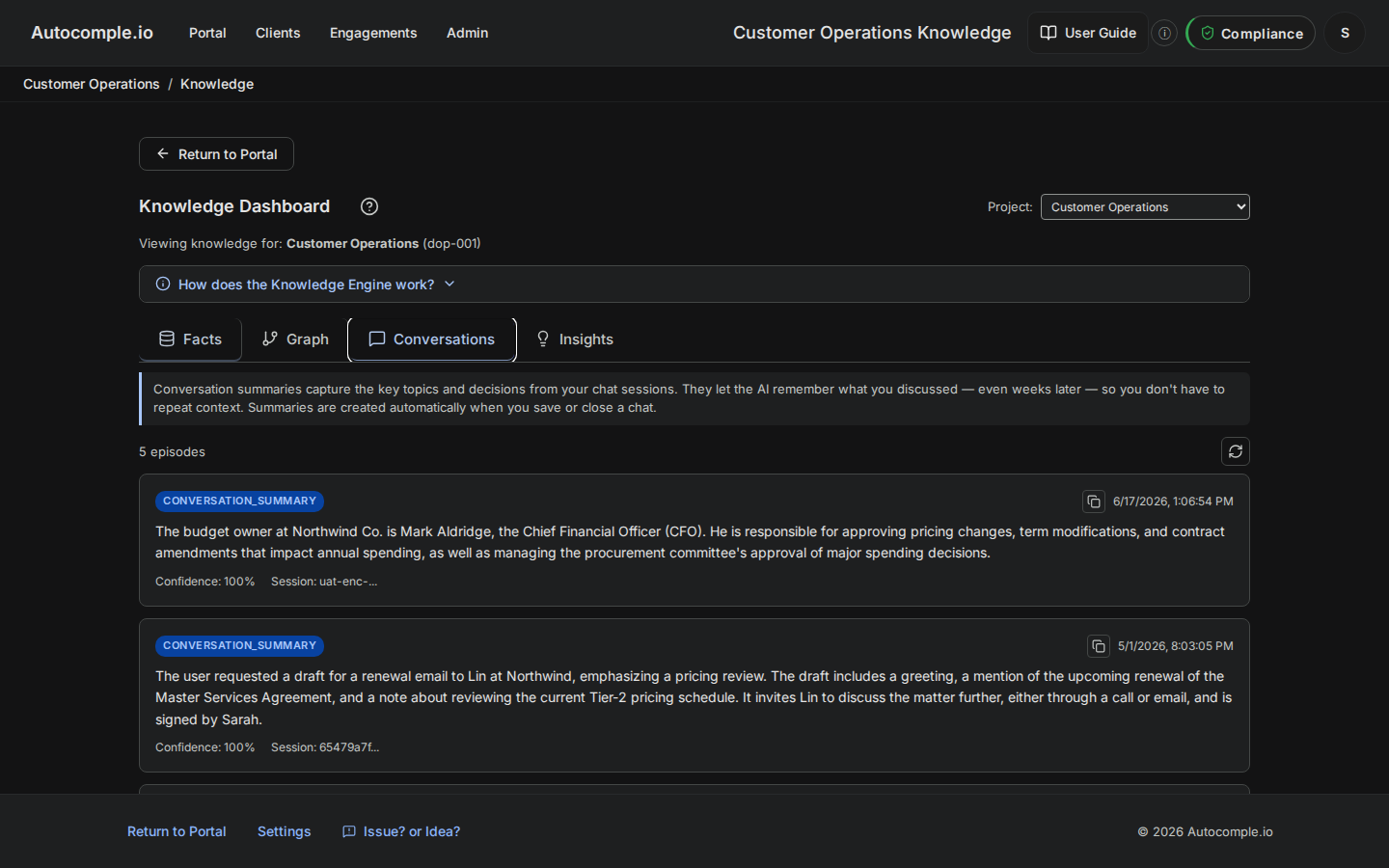
The Conversations tab shows a feed of cards, one per past session. Each card is a short, system-written summary of a conversation someone had with the knowledge base — the gist of what they were after and what the system told them. You browse them the way you'd skim a stack of meeting notes: not to relive every word, but to get the shape of what's been happening.
The key thing to understand is that these are created automatically. You don't write them. When people use the knowledge base — asking it about renewals, about who owns a budget, about whether a price is current — the system consolidates those sessions into episode summaries on its own. Your job is to read them, not to maintain them.
What it's actually good for
Episodic memory does two quiet jobs.
The first is continuity. Because the system remembers the gist of prior sessions, a later conversation can build on an earlier one instead of starting cold every time. The knowledge base feels less like a search box you re-explain yourself to and more like a colleague who was in the last meeting.
The second — and the more useful one for an operator — is a read on demand. The conversations are a record of where your knowledge base is being leaned on. If half the recent sessions are about the same account's renewal, that account is on people's minds. If people keep asking something the graph can't answer well, you've just found a gap to fill — maybe a document you should upload, or a type you should add. The questions point straight at the work.
The mental model
Two kinds of memory, side by side. The Facts tab is semantic memory — what the business knows to be true, distilled from documents. The Conversations tab is episodic memory — what happened, distilled from sessions. People have both kinds too: you know that Paris is the capital of France (semantic), and you remember the conversation where a customer asked you about it last Tuesday (episodic). A knowledge system that has only the first kind is missing half of how memory actually works.
The quiet payoff
Most operators ignore the Conversations tab because it doesn't seem like a "control" — there's nothing to confirm or retract. But it's the cheapest read you have on whether the knowledge base is earning its keep. Five minutes skimming the recent cards tells you what your team is asking, whether the graph is answering, and where to point your next bit of maintenance. The system noticing patterns in the questions is one thing. The system noticing patterns across everything it knows — without anyone asking — is the next tab, and it's where the knowledge base starts working for you instead of just answering you.